# Auto Moderation
The  **Auto Moderation** module can take action on specific words, message spam, too many mentions, attachments, emojis, links being sent and more.
The Auto Moderation module is split up into five categories:
- **AI Moderation** - Use artificial intelligence to automatically moderate your server. Depending on the set language category and sensitivity, flagged words can be deleted, moderated or sent to a moderator for review.
- **Discord's built-in auto moderation** - Sapphire can work together with Discord's AutoMod system. This module lets you set *additional* actions that will be executed when Discord's AutoMod gets triggered.
- **Advanced Auto Moderation** - Sapphire's own Auto Moderation system with advanced filters and high customizability. It includes 12 modules.
- **Join Guard** - Automatically detect and take action against suspicious users joining your server using advanced filters like account age, default avatars, generated names and more.
- **Auto-delete thread creation system messages** - Automatically delete Discord's system messages about created threads.
## AI AutoMod
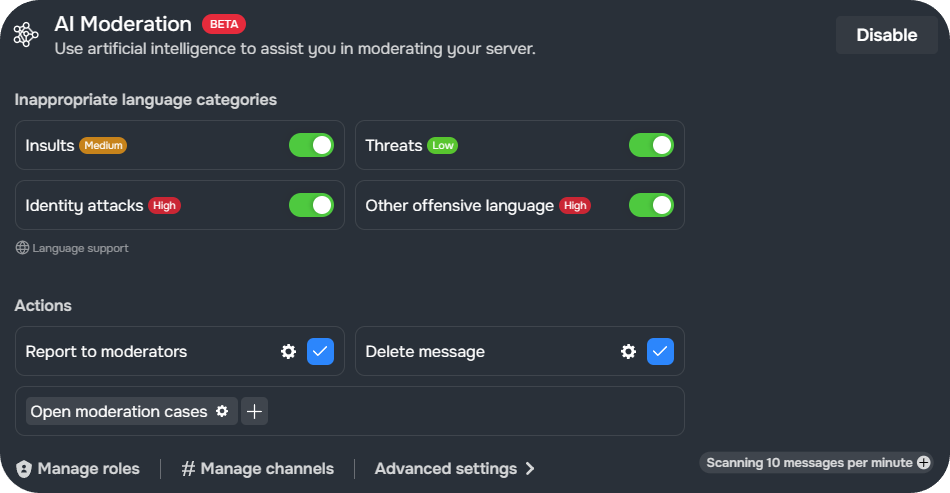
The AI Moderation module uses artificial intelligence to flag users' messages and/or take action. Insults, threats, identity attacks or other offensive language can be detected.
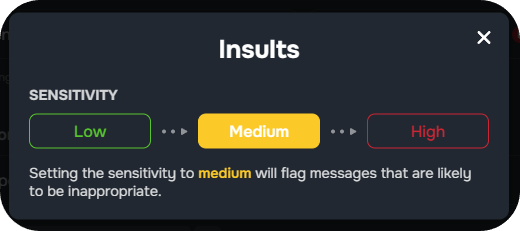
The sensitivity level determines how strictly the AI auto-moderation will flag messages:
- Low may flag less messages, but will only flag messages that are very likely to be inappropriate.
- Medium will only flag messages that are likely to be inappropriate.
- High will flag a wide range of messages that some individuals may find inappropriate.
Each category of inappropriate language has its own sensitivity level, which can be adjusted individually by clicking the corresponding color. Please note that Sapphire currently only scans 10 messages per server per minute. This limit can be increased with Sapphire's [Limit Increase](https://sapph.xyz/limit-increase) plan.
### Actions
Selected actions will be **executed** when **Sapphire's AI AutoMod** system **is triggered**.
**Auto Moderation** module can take action on specific words, message spam, too many mentions, attachments, emojis, links being sent and more.
The Auto Moderation module is split up into five categories:
- **AI Moderation** - Use artificial intelligence to automatically moderate your server. Depending on the set language category and sensitivity, flagged words can be deleted, moderated or sent to a moderator for review.
- **Discord's built-in auto moderation** - Sapphire can work together with Discord's AutoMod system. This module lets you set *additional* actions that will be executed when Discord's AutoMod gets triggered.
- **Advanced Auto Moderation** - Sapphire's own Auto Moderation system with advanced filters and high customizability. It includes 12 modules.
- **Join Guard** - Automatically detect and take action against suspicious users joining your server using advanced filters like account age, default avatars, generated names and more.
- **Auto-delete thread creation system messages** - Automatically delete Discord's system messages about created threads.
## AI AutoMod
The AI Moderation module uses artificial intelligence to flag users' messages and/or take action. Insults, threats, identity attacks or other offensive language can be detected.
The sensitivity level determines how strictly the AI auto-moderation will flag messages:
- Low may flag less messages, but will only flag messages that are very likely to be inappropriate.
- Medium will only flag messages that are likely to be inappropriate.
- High will flag a wide range of messages that some individuals may find inappropriate.
Each category of inappropriate language has its own sensitivity level, which can be adjusted individually by clicking the corresponding color. Please note that Sapphire currently only scans 10 messages per server per minute. This limit can be increased with Sapphire's [Limit Increase](https://sapph.xyz/limit-increase) plan.
### Actions
Selected actions will be **executed** when **Sapphire's AI AutoMod** system **is triggered**.
 ### Detected content & language support
AI Moderation currently fully supports English and German. Other languages are supported as well, but do not support categorization of inappropriate language as shown below.
- **Insults** (Supported languages:
### Detected content & language support
AI Moderation currently fully supports English and German. Other languages are supported as well, but do not support categorization of inappropriate language as shown below.
- **Insults** (Supported languages: 
 )
- **Threats** (Supported languages: )
- **Identity attacks** (Supported languages: )
- **Other offensive language** (Supported languages:
)
- **Threats** (Supported languages: )
- **Identity attacks** (Supported languages: )
- **Other offensive language** (Supported languages: 




 )
### Manage roles
Configure whether specific roles should be excluded from all filters or whether only certain roles should be affected by the module.
### Manage channels
Limit the current condition to specific channels. Excluded channels will not be affected (ignored) by any of the filters set up, while included channels will be affected by the condition.
### Advanced settings
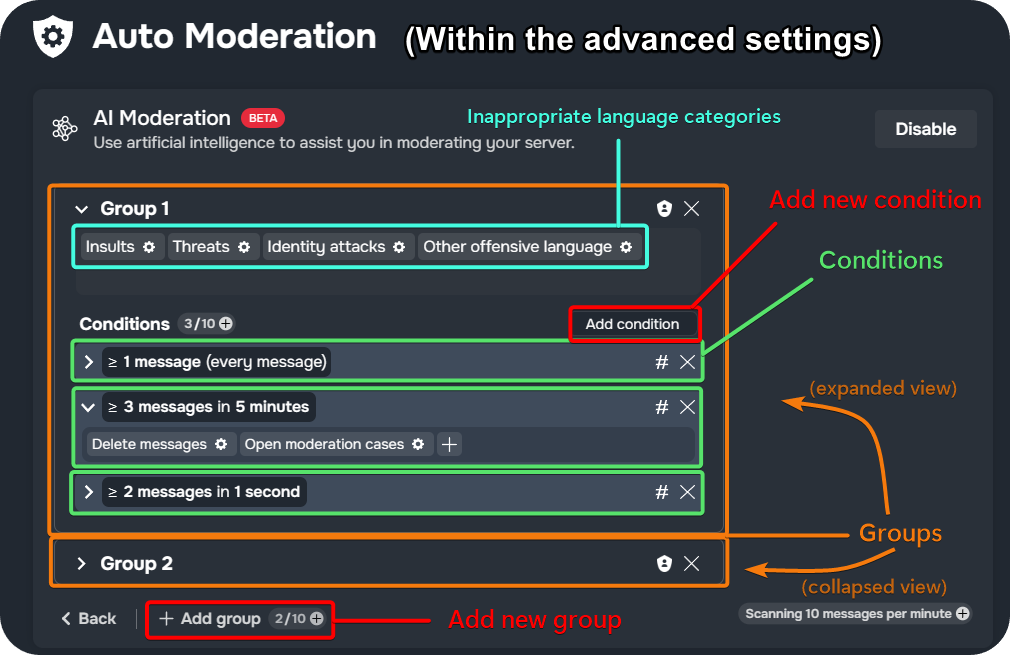
Clicking **Advanced settings** at the bottom of the module opens an interface similar to Sapphire's Advanced AutoMod. It allows the configuration of more complex AI Moderation filters. Instructions on using the advanced settings are provided [in the next section](/automoderation?id=advanced-automod).
)
### Manage roles
Configure whether specific roles should be excluded from all filters or whether only certain roles should be affected by the module.
### Manage channels
Limit the current condition to specific channels. Excluded channels will not be affected (ignored) by any of the filters set up, while included channels will be affected by the condition.
### Advanced settings
Clicking **Advanced settings** at the bottom of the module opens an interface similar to Sapphire's Advanced AutoMod. It allows the configuration of more complex AI Moderation filters. Instructions on using the advanced settings are provided [in the next section](/automoderation?id=advanced-automod).
 ## Discord's AutoMod
Discord's built-in auto moderation system can be set up within Discord in [your server's settings](https://support.discord.com/hc/articles/4421269296535-AutoMod-FAQ). Sapphire can work with the AutoMod rules set up in your server to expand their functionality.
After creating AutoMod rules under **Server Settings** ➜ **Safety Setup** ➜ **AutoMod**, they will appear under the **Discord's Built-In Auto Moderation** category in Sapphire's dashboard.
You can then add additional actions and conditions. These actions will be **executed** when **Discord's AutoMod** system **is triggered**.
## Advanced AutoMod
Sapphire’s own Auto Moderation system has advanced filters and high customizability. It consists of 12 modules.
### Setting up Advanced Auto Moderation
#### Module structure
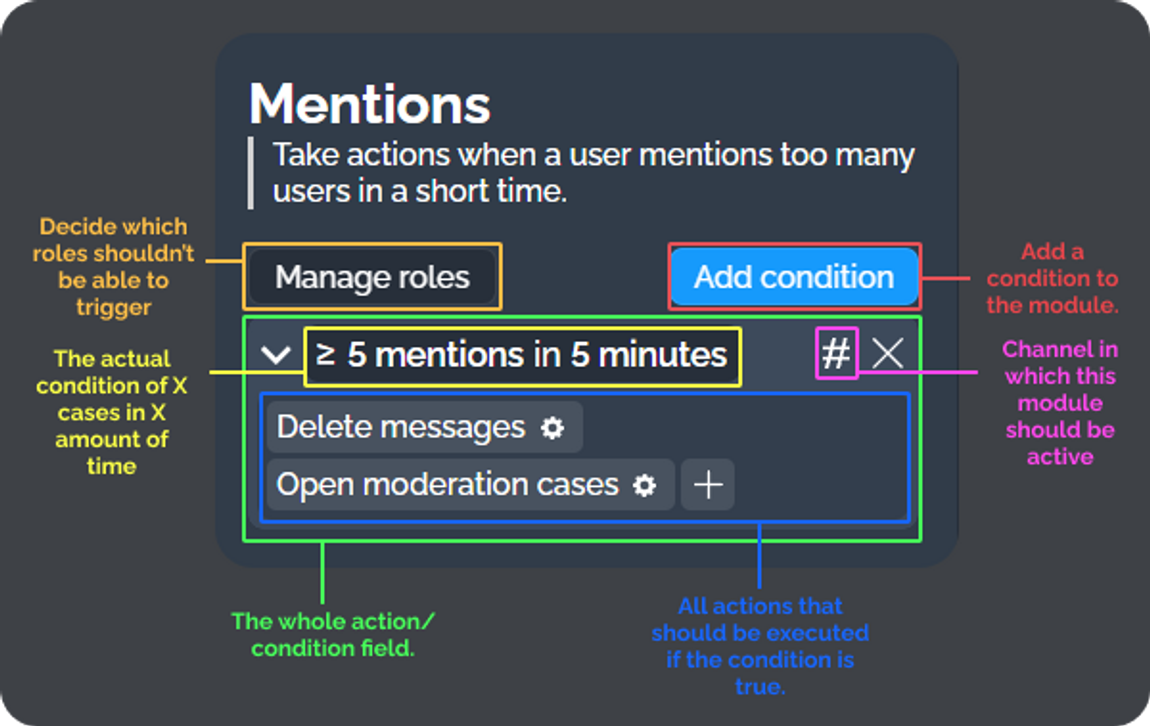
All modules have a similar structure:
| Element | Description |
|-----------------|---------------------------------------------------------------------------------------------|
| `Manage roles` | Manage which roles should be excluded (ignored) or included for this module. |
| `#` | Manage which channels should be excluded (ignored) or included for this condition. |
| `Add condition` | Adds a condition for you to edit and decide under which circumstances Auto Moderation should be executed. |
| `Action field` | Displays all added conditions with their actions. |
## Discord's AutoMod
Discord's built-in auto moderation system can be set up within Discord in [your server's settings](https://support.discord.com/hc/articles/4421269296535-AutoMod-FAQ). Sapphire can work with the AutoMod rules set up in your server to expand their functionality.
After creating AutoMod rules under **Server Settings** ➜ **Safety Setup** ➜ **AutoMod**, they will appear under the **Discord's Built-In Auto Moderation** category in Sapphire's dashboard.
You can then add additional actions and conditions. These actions will be **executed** when **Discord's AutoMod** system **is triggered**.
## Advanced AutoMod
Sapphire’s own Auto Moderation system has advanced filters and high customizability. It consists of 12 modules.
### Setting up Advanced Auto Moderation
#### Module structure
All modules have a similar structure:
| Element | Description |
|-----------------|---------------------------------------------------------------------------------------------|
| `Manage roles` | Manage which roles should be excluded (ignored) or included for this module. |
| `#` | Manage which channels should be excluded (ignored) or included for this condition. |
| `Add condition` | Adds a condition for you to edit and decide under which circumstances Auto Moderation should be executed. |
| `Action field` | Displays all added conditions with their actions. |
 #### Conditions
Sapphire’s Auto Moderation feature is based on *conditions*. Click `Add condition` to add a condition to an Auto Moderation module.
Sapphire's Auto Moderation modules are only executed when a user's messages in a Discord channel meet the criteria set by the module.
A condition consists of:
| Condition Element | Description |
|-----------------------------------|-------------|
| `=` or `≥`
#### Conditions
Sapphire’s Auto Moderation feature is based on *conditions*. Click `Add condition` to add a condition to an Auto Moderation module.
Sapphire's Auto Moderation modules are only executed when a user's messages in a Discord channel meet the criteria set by the module.
A condition consists of:
| Condition Element | Description |
|-----------------------------------|-------------|
| `=` or `≥`
*(Operator)* | Choose if the actions should be executed when the user sends exactly (`=`) or more than (`≥`) the specified number of messages.
*E.g., Should the actions be executed if a user sends exactly (`=`) 5 mentions, or more or exactly (`≥`) 5 mentions?* |
| `Amount X`
*(Message Count)* | The number of messages the user must send in order for the actions to be executed. |
| `Time X`
*(Time Frame)* | The time frame in which the user must send the specified number of messages.
*E.g., Should the actions be executed if the user sends 5 mentions in 15 seconds or in 5 minutes?* |
| `Type of time`
*(Time Unit)* | The unit for `Time X`, which can be `seconds`, `minutes`, `hours`, or `days`. |
#### Groups
Some modules don't instantly allow you to add conditions but require a group to be added first. Groups can contain both words and conditions. This way, the words added to a group are bound to the conditions of that group.
If a user would send a message that contains **a word** that is **in a group**, the **condition** of that group will be **executed**.
A group's **word list** can also be **expanded** for a more **detailed view** of the added words and a few options:
📂 Expanded Group Options
| Option | Description |
|----------------------------|-------------|
| **Toggle: Ignore capitalization** | Choose whether the group should ignore uppercase and lowercase letters when matching words. |
| **Toggle: Require spaces** | Decide if words should only match when they stand alone, surrounded by spaces. |
| **New regular expression** | Add a custom regular expression (RegEx) to define advanced word-matching rules. Useful for catching variations of words or patterns. |
| **New word group** | Create a sub-group (similar to folders) within the main group. They have their own settings. |
| **Export words** | Download the current list of words in the group as a text file or JSON Array. |
| **Import words** | Upload or import a list of words from another Discord bot, text, or text file. |
| **Clear words** | Removes all words from the group at once. |
| **Sort from A to Z** | Automatically sort the words alphabetically from **A to Z** or **Z to A**. |
| **Display as list/tiles** | Toggle between a list view and tile view for the words. |
> RegEx Limitation: Sapphire does not support negative lookahead (`(?!...)`) and negative lookbehind (`(?
#### Manage roles
Click `Manage roles` to ignore roles from the module (exclude) or to apply the module only to selected roles (include).
#### Excluding or including channels
Clicking the `#` next to a condition lets you restrict that condition to specific channels or exclude it from specific channels.
#### Actions
Actions let you decide what should happen when a user triggers a condition.
To add an action to a condition, click the `+` in the action field and select the actions to execute when a user triggers the module. Click the gear next to the action to configure it.
📂 Action Types (Click to expand)
| Action | Description |
|--------|-------------|
| **Report to moderators** | Creates a report message that will be sent to a selected channel. |
| **Delete message** | Deletes messages that meet the condition. |
| **Send message** | Sends the selected template into the channel. |
| **DM user** | Sends the selected template to the user's direct messages. |
| **Open Moderation Cases** | Opens a Moderation Case (warns, mutes, kicks, or bans the user). |
| **Add reactions** | Adds message reactions to messages that meet the condition. |
| **Add roles** | Adds the selected role. |
| **Remove roles** | Removes the selected role. |
| **Set roles** | Removes all other roles and just adds the selected role. |
## Join Guard
 **Join Guard** is a security feature that automatically detects and takes action against suspicious users joining your server. This feature helps protect your server from potential threats before they can cause harm.
Join Guard uses seven detection filters (account age, account creation date, default avatars, generated names, name content, guild tags, and unverified bots) that are combined with `AND` logic. When triggered, it can automatically execute multiple actions including moderation cases, role management, messaging, and logging.
**📖 [Learn how to set up Join Guard](guides/join-guard.md)**
## Commands overview
**Join Guard** is a security feature that automatically detects and takes action against suspicious users joining your server. This feature helps protect your server from potential threats before they can cause harm.
Join Guard uses seven detection filters (account age, account creation date, default avatars, generated names, name content, guild tags, and unverified bots) that are combined with `AND` logic. When triggered, it can automatically execute multiple actions including moderation cases, role management, messaging, and logging.
**📖 [Learn how to set up Join Guard](guides/join-guard.md)**
## Commands overview
This feature can also be set up and managed via
Sapphire's dashboard
.
| Command | Description | Usage |
| --- | --- | --- |
| automoderation | Displays information about Sapphire's auto moderation feature. | automoderation |