# General Settings
The  **General Settings** module allows you to customize how date data is displayed in your server.
## Duration Language
To change the language used for **duration data**, update the **ISO 639-1** code in the settings. The ISO 639-1 code is a **two-letter identifier** for a specific language. For example, the code for English is `en`, and for German, it is `de`.
View the full list of ISO codes [here](https://www.loc.gov/standards/iso639-2/php/code_list.php).

w> Note: Sapphire is currently only available in English. However, you can change the language of Sapphire's default messages by applying community-made [Message Kits](https://docs.sapph.xyz/#/messages?id=message-kits).
## Date Format
The date format defines how dates are displayed in Sapphire's messages.
The default format is `DD/MM/YYYY - HH:mm`.
You can customize this format using abbreviations from the list below.
| Abbreviation | Definition | Example |
| --- | --- | --- |
| DD | Day | 17 |
| MM | Month | 07 |
| MMMM | Month written | July |
| MMM | Month written, abbreviated | Jul |
| YYYY | Year | 2021 |
| YY | Year, abbreviated | 21 |
| HH | Hour | 07 |
| mm | Minutes | 50 |
| dddd | Weekday | Saturday |
| a | Time of day | am / pm |
## Error Log
The **Error Log** displays problems and errors that have occurred during your Sapphire usage. These errors may include messages that could not be sent, roles that could not be added, or general permission errors.
- Remove error messages by clicking `Clear all` or the trash can icon next to each message.
- Click on the eye icon to get more details about the cause of the error.
## Manager Roles
**Manager Roles** grant users the ability to fully manage Sapphire and its features. Users with a manager role are able to view the dashboard and change all settings.
i> Roles with `Manage Server` or `Administrator` permissions are automatically added and cannot be removed.
## Advanced Permissions
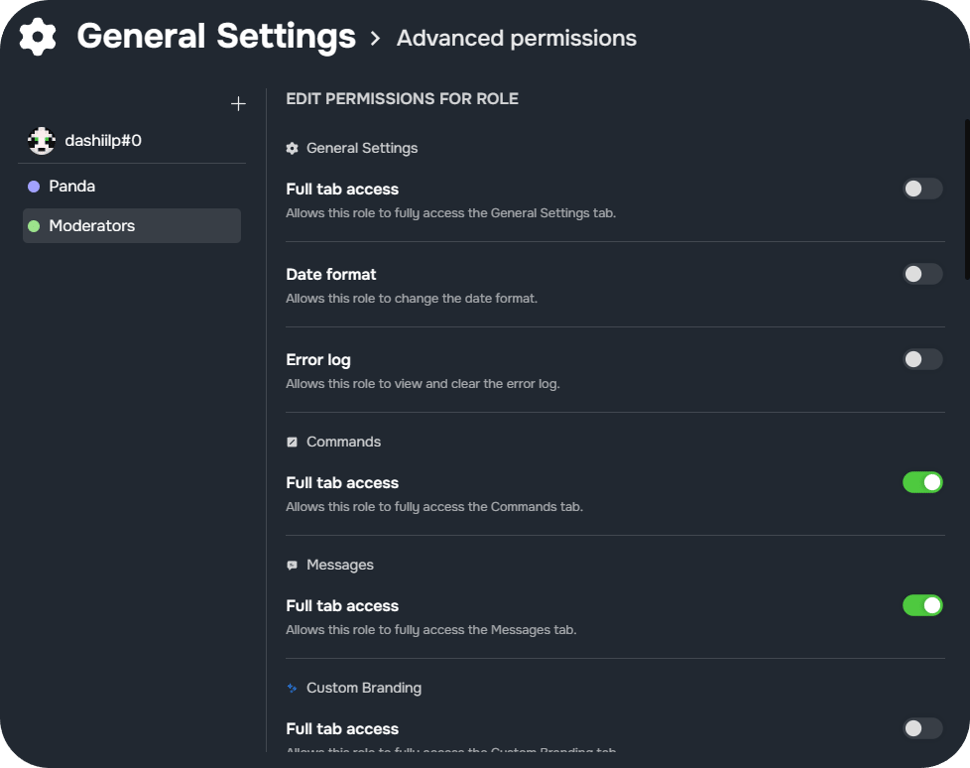
**Advanced Permissions** allow specific users or roles to have advanced permissions for particular modules.
By clicking the `+` icon, a new user or role can be added. Add users by entering their [Discord User ID](https://support.discord.com/hc/articles/206346498-Where-can-I-find-my-User-Server-Message-ID-).
**General Settings** module allows you to customize how date data is displayed in your server.
## Duration Language
To change the language used for **duration data**, update the **ISO 639-1** code in the settings. The ISO 639-1 code is a **two-letter identifier** for a specific language. For example, the code for English is `en`, and for German, it is `de`.
View the full list of ISO codes [here](https://www.loc.gov/standards/iso639-2/php/code_list.php).

w> Note: Sapphire is currently only available in English. However, you can change the language of Sapphire's default messages by applying community-made [Message Kits](https://docs.sapph.xyz/#/messages?id=message-kits).
## Date Format
The date format defines how dates are displayed in Sapphire's messages.
The default format is `DD/MM/YYYY - HH:mm`.
You can customize this format using abbreviations from the list below.
| Abbreviation | Definition | Example |
| --- | --- | --- |
| DD | Day | 17 |
| MM | Month | 07 |
| MMMM | Month written | July |
| MMM | Month written, abbreviated | Jul |
| YYYY | Year | 2021 |
| YY | Year, abbreviated | 21 |
| HH | Hour | 07 |
| mm | Minutes | 50 |
| dddd | Weekday | Saturday |
| a | Time of day | am / pm |
## Error Log
The **Error Log** displays problems and errors that have occurred during your Sapphire usage. These errors may include messages that could not be sent, roles that could not be added, or general permission errors.
- Remove error messages by clicking `Clear all` or the trash can icon next to each message.
- Click on the eye icon to get more details about the cause of the error.
## Manager Roles
**Manager Roles** grant users the ability to fully manage Sapphire and its features. Users with a manager role are able to view the dashboard and change all settings.
i> Roles with `Manage Server` or `Administrator` permissions are automatically added and cannot be removed.
## Advanced Permissions
**Advanced Permissions** allow specific users or roles to have advanced permissions for particular modules.
By clicking the `+` icon, a new user or role can be added. Add users by entering their [Discord User ID](https://support.discord.com/hc/articles/206346498-Where-can-I-find-my-User-Server-Message-ID-).
 ## Data deletion behavior
- **Instantly delete data when bot is kicked**: By default, Sapphire deletes your server configuration data three days after it is kicked from your server. If this option is enabled, your data will be deleted instantly when Sapphire is kicked from your server.
## Backups
Sapphire automatically creates backups of your server’s bot configuration, allowing you to restore your config in case of accidental changes. To recover your configuration, you must request restoration of a created backup.
## Data deletion behavior
- **Instantly delete data when bot is kicked**: By default, Sapphire deletes your server configuration data three days after it is kicked from your server. If this option is enabled, your data will be deleted instantly when Sapphire is kicked from your server.
## Backups
Sapphire automatically creates backups of your server’s bot configuration, allowing you to restore your config in case of accidental changes. To recover your configuration, you must request restoration of a created backup.