 **Logging** module allows you to choose which actions to log, configure specific log channels, and every log message is fully customizable.
## Set up channels
Configure **Logging** by assigning channels for specific log types.
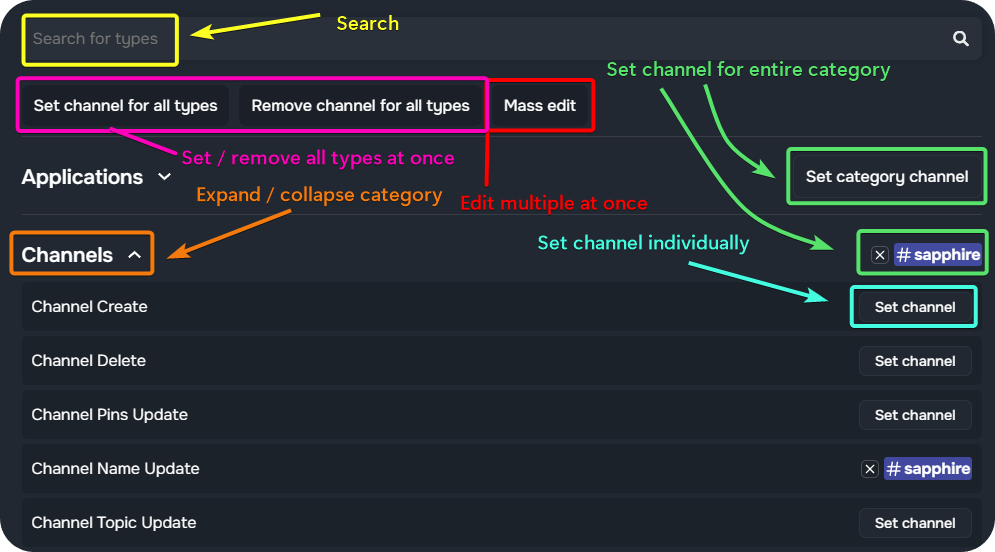
**Log types** are **grouped** into categories. They can be expanded by clicking on the category's name.
To set a channel to which the logs are sent to, click `Set channel` in the expanded view. When setting a channel for an entire category, the selected channel will apply to all log types in that category.
To edit multiple log types at once, select `Mass edit` and select preferred log types or categories. Then, choose `Set channel` or `Remove channel`.
To remove a log type, click the `X` icon next to the channel name.
**Logging** module allows you to choose which actions to log, configure specific log channels, and every log message is fully customizable.
## Set up channels
Configure **Logging** by assigning channels for specific log types.
**Log types** are **grouped** into categories. They can be expanded by clicking on the category's name.
To set a channel to which the logs are sent to, click `Set channel` in the expanded view. When setting a channel for an entire category, the selected channel will apply to all log types in that category.
To edit multiple log types at once, select `Mass edit` and select preferred log types or categories. Then, choose `Set channel` or `Remove channel`.
To remove a log type, click the `X` icon next to the channel name.
 ## Thread/forum logs
You can set a thread or forum channel as a log channel. Since threads and forum channels are not displayed in the channel picker, a small workaround must to be used.
1. Click the `Set Channel` button next the preferred log type.
2. From the channels list, select `Use other channel`.
3. A **unique message** will be **generated**. Copy this message.
4. Navigate to the thread or forum you wish to use as the log channel.
5. Paste the previously copied message into the thread or forum channel.
i> If this doesn't work, ensure that Sapphire has permissions to view and send messages in the selected channel.
## Ignore from logs
Embed messages, channels, roles, or users can be ignored from **Sapphire's Logging** system.
To ignore something from Sapphire's Logging, navigate to the `Settings` tab at the top of the Logging module.
| Option | Description | How to configure |
|--------|-------------|------------------|
| **Embed messages** | Ignore embed messages from being logged. | Toggle **on** (
## Thread/forum logs
You can set a thread or forum channel as a log channel. Since threads and forum channels are not displayed in the channel picker, a small workaround must to be used.
1. Click the `Set Channel` button next the preferred log type.
2. From the channels list, select `Use other channel`.
3. A **unique message** will be **generated**. Copy this message.
4. Navigate to the thread or forum you wish to use as the log channel.
5. Paste the previously copied message into the thread or forum channel.
i> If this doesn't work, ensure that Sapphire has permissions to view and send messages in the selected channel.
## Ignore from logs
Embed messages, channels, roles, or users can be ignored from **Sapphire's Logging** system.
To ignore something from Sapphire's Logging, navigate to the `Settings` tab at the top of the Logging module.
| Option | Description | How to configure |
|--------|-------------|------------------|
| **Embed messages** | Ignore embed messages from being logged. | Toggle **on** ( ) to ignore embed messages. |
| **Channels** | Ignore specific Discord channels from being logged. | Click the `+` next to *No channels added* and select channels to ignore. |
| **Roles** | Ignore Discord roles from being logged. | Click the `+` next to *No roles added* and select roles to ignore. |
| **Users** | Ignore specific users from being logged. | Enter the **User IDs** of the users that should be ignored. |
| **Polls** | Deleted [Discord polls](https://support.discord.com/hc/articles/22163184112407-Polls-FAQ) are logged as both `Message Delete` and `Poll Delete`. | Toggle **off** (
) to ignore embed messages. |
| **Channels** | Ignore specific Discord channels from being logged. | Click the `+` next to *No channels added* and select channels to ignore. |
| **Roles** | Ignore Discord roles from being logged. | Click the `+` next to *No roles added* and select roles to ignore. |
| **Users** | Ignore specific users from being logged. | Enter the **User IDs** of the users that should be ignored. |
| **Polls** | Deleted [Discord polls](https://support.discord.com/hc/articles/22163184112407-Polls-FAQ) are logged as both `Message Delete` and `Poll Delete`. | Toggle **off** ( ) to log only `Poll Delete`. |
| **Sticky messages** | Ignore [sticky messages](https://docs.sapph.xyz/#/guides/sticky-message) from being logged. | Toggle **off** () to exclude sticky messages. |
| **Apply ignore to users in voice** | Ignore users in voice channels from being logged. | Toggle **on** () to ignore users in voice channels if they belong to an **ignored** role or user list. **Voice log messages** will not be sent for them. |
## Commands overview
) to log only `Poll Delete`. |
| **Sticky messages** | Ignore [sticky messages](https://docs.sapph.xyz/#/guides/sticky-message) from being logged. | Toggle **off** () to exclude sticky messages. |
| **Apply ignore to users in voice** | Ignore users in voice channels from being logged. | Toggle **on** () to ignore users in voice channels if they belong to an **ignored** role or user list. **Voice log messages** will not be sent for them. |
## Commands overview
This feature can also be set up and managed via Sapphire's dashboard .
| Command | Description | Usage | | --- | --- | --- | | log | Manages Logging. | log [<